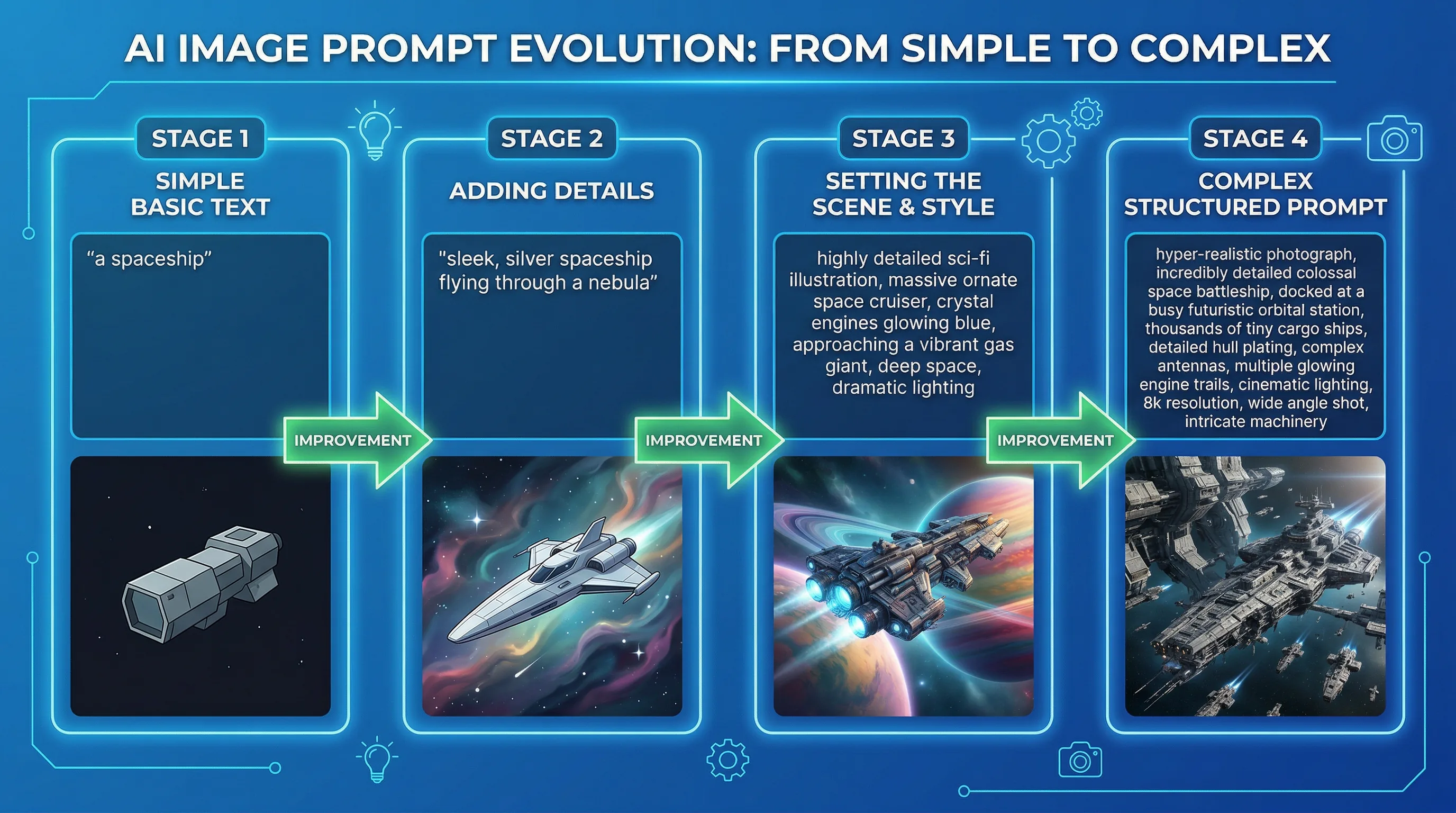
AI Image Prompts From Beginner to Advanced: A Visual Prompt Engineering Guide
AI image prompts determine the difference between a generic, forgettable visual and a stunning image that looks like it was created by a professional designer.

The Artifio editorial team publishes research, tutorials, and release notes covering image, video, and audio generation models. All posts are reviewed by an editor before publishing.
AI image prompts determine the difference between a generic, forgettable visual and a stunning image that looks like it was created by a professional designer. This guide takes you from writing your first image prompt to mastering advanced techniques like negative prompting, style mixing, and parameter control — with clear examples at every level. Whether you've never written an image prompt or you're looking to refine your technique, there's a concrete takeaway for your skill level.
Most prompt guides either oversimplify ("just describe what you want!") or overwhelm with jargon. This one gives you practical frameworks you can use immediately, then builds toward advanced techniques as you grow.
Level 1: The Basics of AI Image Prompting
If you're new to AI image generation, start here. Master these fundamentals before moving to intermediate techniques.
Subject + Style + Mood: The Core Formula
Every effective AI image prompt includes at least three elements: what you want to see (subject), how it should look (style), and how it should feel (mood/lighting).
The basic formula: [Subject] in [Style], [Mood/Lighting], [Composition]
Examples at increasing specificity:
- Weak: "A cat" — produces a generic, default-looking cat image
- Better: "A tabby cat sitting on a windowsill, watercolor style, warm afternoon light"
- Best: "An orange tabby cat sitting on a sunlit windowsill looking outside, loose watercolor style on textured paper, warm golden afternoon light casting long shadows, intimate close-up composition"
Notice how each version adds specific details that reduce the model's guesswork. More specificity = better results at every level.
Common Beginner Mistakes
Avoid these frequent pitfalls:
- Too long and contradictory: "A calm, energetic, peaceful, intense scene" — contradictory adjectives confuse the model
- Too vague: "Something beautiful" — beauty needs specific parameters
- Narrative instead of visual: "A character who has been through many hardships" — describe what they look like, not their backstory
- Listing every detail: Overly long prompts dilute the importance of each element. Focus on the 5-7 most important visual attributes
Level 2: Intermediate Prompt Techniques
Once you're comfortable with the basics, these techniques give you significantly more control over your output.
Controlling Composition
Use photography and art terminology to direct composition:
- Camera angle: "shot from below looking up" (dramatic), "overhead flat lay" (design), "eye level" (neutral)
- Lens simulation: "wide angle lens distortion" (expansive), "telephoto compression" (intimate), "macro close-up" (detail)
- Depth of field: "shallow depth of field with bokeh background" (subject isolation), "everything in sharp focus" (informational)
- Framing: "extreme close-up of eyes only," "full body with environment visible," "medium shot from waist up"
These terms work because AI models were trained on millions of photographs tagged with exactly this vocabulary. You're speaking the model's visual language.
Lighting and Atmosphere
Lighting is the single most impactful element after subject matter. Describe it with precision:
- "Golden hour warm directional light from the left" — romantic, warm, specific direction
- "Overcast diffused soft light, no harsh shadows" — even, flattering, natural
- "Single spotlight from above creating dramatic shadows" — theatrical, moody
- "Neon light reflections on wet surfaces" — urban, cinematic, colorful
- "Candlelight only, warm glow, deep shadows" — intimate, atmospheric
Color Palette Direction
Don't let the AI choose colors. Specify your palette:
- "Monochromatic blue palette" — single color family, sophisticated
- "Complementary orange and teal" — cinematic, high contrast
- "Earth tones: terracotta, olive, cream, rust" — organic, warm
- "Pastel palette: blush, mint, lavender, soft gold" — soft, approachable
- "Black and white with single red accent" — dramatic, focused
Color control creates immediate visual consistency across multiple generations and makes your images feel intentional rather than random.
Level 3: Advanced Prompt Engineering
These techniques require understanding model behavior and produce the most distinctive, controlled results.
Negative Prompts and Exclusions
Negative prompts tell the AI what NOT to include. They're essential for avoiding unwanted elements and common artifacts. As referenced by resources at Stability AI, negative prompting is a core technique for professional-quality output.
Standard negative prompt for quality: "blurry, low quality, distorted, deformed, disfigured, watermark, signature, oversaturated, noisy, grainy (unless intended)"
Subject-specific additions:
- People: "extra fingers, merged fingers, bad anatomy, asymmetric eyes"
- Products: "busy background, text, logos, distracting elements"
- Landscapes: "power lines, modern buildings (if historical), lens flare"
- Minimalist designs: "cluttered, overly detailed, busy, complex"
Style Mixing and Mashups
Combine unrelated styles for original results that don't exist in the training data:
- "Cyberpunk ukiyo-e" — Japanese woodblock aesthetic meets futuristic technology
- "Art Deco data visualization" — elegant 1920s style applied to modern infographics
- "Brutalist botanical" — raw industrial aesthetic meets delicate nature subjects
- "Vaporwave Renaissance portrait" — classical painting meets 80s/90s digital aesthetics
The novelty of these combinations forces the model to interpolate between styles, producing something genuinely new. This is how you create a visual signature that's uniquely yours.
Technical Parameters and Weights
Some models support weighted terms that control relative importance. The syntax varies by model, but the concept is universal:
- Emphasis: Giving certain elements more weight than others (e.g., prioritizing lighting over subject detail)
- De-emphasis: Reducing the influence of certain prompt elements
- Ordering: Many models prioritize elements that appear earlier in the prompt — put your most important elements first
Advanced prompt techniques work differently across models. Artifio's multi-model access lets you test the same prompt across providers and find which responds best to your prompting style. A prompt that produces stunning results in one model might produce mediocre output in another — and vice versa.
Seed Control for Reproducibility
Seeds are numerical values that control the "randomness" of generation. Same seed + same prompt + same model = nearly identical output. This is essential for:
- Iteration: Generate a great image, note the seed, then tweak the prompt while keeping the composition similar
- Consistency: Use the same seed across related images for a cohesive visual series
- Variation: Change only the seed to get different interpretations of the same prompt
Prompt Libraries: Ready-to-Use Templates
Save these templates and customize for your specific needs.
Portrait Prompts
"[Age] [gender] with [hair description], [clothing], [expression], [lighting: e.g., soft Rembrandt lighting], [background: e.g., blurred urban environment], [style: e.g., editorial fashion photography], shot on [camera: e.g., Canon 85mm f/1.4]"
Negative: "deformed face, extra fingers, bad anatomy, asymmetric eyes, uncanny valley"
Landscape and Architecture Prompts
"[Scene type: e.g., mountain lake at dawn], [weather: e.g., light morning mist], [style: e.g., Ansel Adams black and white], [composition: e.g., foreground rocks leading to lake], [lighting: e.g., first light hitting peaks], [mood: e.g., serene and vast]"
Negative: "people, modern structures (if natural), power lines, lens flare, oversaturated"
Product and Commercial Prompts
"[Product] on [surface] in [setting], [lighting: e.g., studio softbox from above and left], [background: e.g., clean gradient], [style: e.g., commercial product photography], [color temperature: e.g., neutral white balance]"
Negative: "busy background, text, watermark, harsh shadows, reflection artifacts"
Abstract and Artistic Prompts
"Abstract [subject/concept] in [medium: e.g., oil paint], [color palette: e.g., deep blues and golds], [movement: e.g., flowing, dynamic], [texture: e.g., heavy impasto], [mood: e.g., contemplative], [reference: e.g., inspired by abstract expressionism]"
Negative: "photorealistic, figurative, literal, text, geometric (unless intended)"
For more on breaking the default AI look with these techniques, see our visual styles guide. For anatomy-specific tips, check our anatomy fix guide. And for a broader context, our complete AI image generation guide covers the full landscape. For text-based prompts, see our 50 AI writing prompts.
Building Your Personal Prompt Library
The most valuable asset an AI image creator develops over time isn't a collection of images — it's a collection of proven prompts.
How to Organize Your Library
Create a structured document or spreadsheet with these columns for each saved prompt:
- Prompt text: The exact prompt that produced the result
- Model used: Which AI model generated this result
- Settings: Seed value, temperature, guidance scale, steps
- Result quality: Your rating of the output (1-10)
- Best use case: What type of content this prompt works best for
- Variations tried: Notes on what happens when you modify specific elements
After 50-100 documented prompts, your library becomes a powerful reference that dramatically speeds up future image creation. Instead of starting from scratch, you start from a proven foundation and customize for each specific need. The time investment in documentation pays compound returns — every future project benefits from every past experiment.
Frequently Asked Questions
How do I write better AI image prompts?
Follow the formula: subject + style + mood + composition + technical details. Be specific — "woman in red coat walking through autumn forest, soft overcast light, shot from behind, shallow depth of field" outperforms "woman in forest."
What are negative prompts in AI image generation?
Negative prompts tell the AI what to exclude from the image. Examples: "no text, no watermark, no deformed hands, no blurry, no oversaturated." They're essential for avoiding common artifacts and unwanted elements.
How long should AI image prompts be?
50-150 words is the right balance for most models. Too short produces generic results; too long can confuse the model. Focus on the most important elements first, as some models prioritize early prompt elements.
Do AI image prompts work the same across all models?
No. Each model interprets prompts differently. Some respond better to natural language, others to keyword lists. Some support weighted terms and technical parameters that others ignore. Test your prompts across models for best results.
Can I save and reuse AI image prompts?
Absolutely — and you should. Build a prompt library organized by style and use case. Document which model, settings, and seed produced your best results. This library becomes increasingly valuable over time.
Put your prompts to work across 100+ AI models. Join Artifio and discover which model turns your vision into reality.