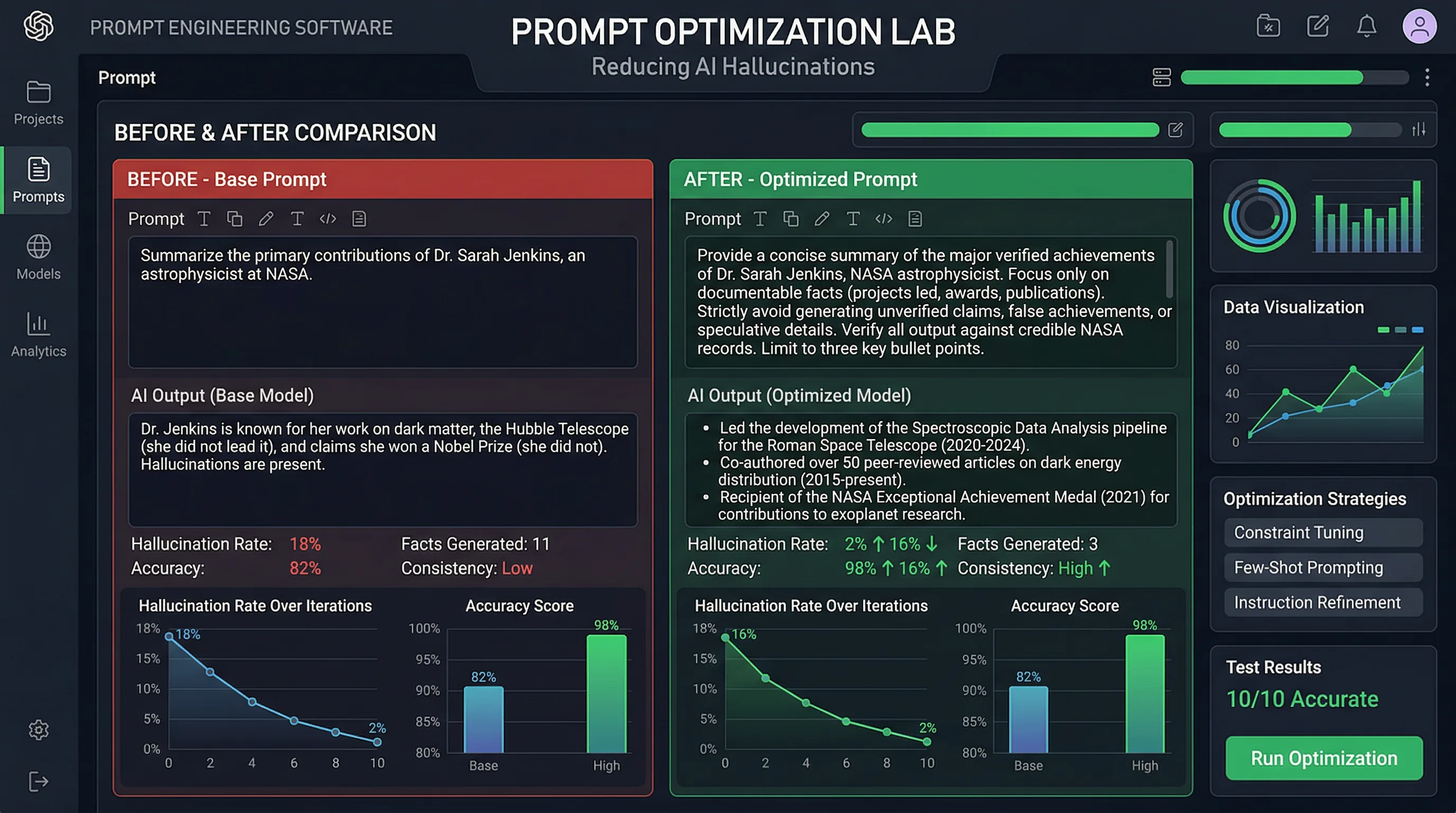
10 Prompt Engineering Techniques That Dramatically Reduce AI Hallucinations
You can dramatically reduce AI hallucinations — fabricated facts, invented sources, wrong data — with the right prompting techniques. The same AI model can hallucinate frequently or rarely depending on how you prompt it.

The Artifio editorial team publishes research, tutorials, and release notes covering image, video, and audio generation models. All posts are reviewed by an editor before publishing.
You can dramatically reduce AI hallucinations — fabricated facts, invented sources, wrong data — with the right prompting techniques. The same AI model can hallucinate frequently or rarely depending on how you prompt it. These 10 techniques, grounded in research and practical testing, consistently improve factual accuracy across AI models. They won't eliminate hallucinations entirely (nothing will), but they can cut fabrication rates by 40–70%.
Why Prompt Engineering Matters for Accuracy
The way you ask an AI to create content fundamentally shapes the quality and accuracy of its output. A vague prompt invites the model to fill gaps with plausible-sounding fabrications. A well-structured prompt constrains the model toward verifiable, accurate output.
Research from Anthropic's research on reducing hallucinations demonstrates that prompting technique is one of the most powerful levers for improving AI accuracy — often more impactful than switching models entirely. These techniques work across models, though effectiveness varies. Test each one on your platform and measure the improvement.
Techniques 1–5: Foundational Accuracy Prompts
These five techniques are the foundation of accuracy-focused prompting. Build them in every prompt where factual accuracy matters.
1. Explicit Uncertainty Instructions
The simplest and most effective technique: tell the AI to express uncertainty. Add this to your prompts: "If you're not certain about a specific fact, statistic, or date, explicitly say so. Do not fabricate information. It's better to say 'I'm not sure about this — please verify' than to state something that might be incorrect."
Why it works: By default, AI models are optimized for fluent, confident output. Explicit permission to express uncertainty overrides this default and activates more conservative text generation. The model literally changes its word choice strategy when given these instructions.
2. Source Grounding
Provide the actual source material you want the content based on. Instead of "Write an article about AI trends," try: "Based on the following research findings [paste relevant content], write an article covering these specific points. Only reference information contained in the provided material."
This technique works because the model draws from verified material rather than its training data. Hallucination rates drop dramatically when the model has explicit source material to reference. It's more preparation work upfront but saves significant fact-checking time afterward.
3. Step-by-Step Reasoning Chains
Ask the AI to show its reasoning: "For each claim you make, explain your reasoning and the basis for the claim." This technique, sometimes called "chain-of-thought prompting," forces the model to externalize its logic — and logical gaps that lead to hallucinations become visible.
When an AI generates "73% of businesses have adopted AI" and then must explain where that number comes from, the model is more likely to either produce a verifiable claim or acknowledge uncertainty.
4. Asking the Model to Self-Verify
After generating content, include a verification step in the same prompt: "After generating your response, review each factual claim for accuracy. Flag any claim you're less than 90% confident about with [NEEDS VERIFICATION]."
Self-verification isn't foolproof — the model can still miss its own hallucinations — but it catches a meaningful percentage of errors. Think of it as an automatic first-pass filter. Our thorough guide on AI hallucinations explains why this works.
5. Constraining the Output Scope
Narrow prompts produce more accurate output than broad ones. "Explain how GDPR Article 22 applies to automated decision-making" will generate more accurate content than "Explain GDPR." The narrower scope means the model pulls from a more concentrated knowledge base, reducing the need to fill gaps with fabrication.
For long content, break it into focused sections and generate each separately with targeted prompts.
Techniques 6–10: Advanced Accuracy Methods
These techniques build on the foundations above and provide additional accuracy improvements for creators who need maximum reliability.
6. Temperature and Sampling Adjustments
If your AI tool allows you to adjust the "temperature" parameter, lower it for factual content. Temperature controls how creative/random the model's output is. Lower values (0.1–0.4) produce more conservative, predictable output with fewer hallucinations. Higher values (0.7–1.0) produce more creative output with more risk of fabrication.
For factual articles, reports, and data-driven content, use low temperature. For creative writing, brainstorming, and ideation, higher temperature is fine — accuracy matters less in those contexts.
7. Cross-Model Verification Chains
Generate content with one model, then feed it to a different model with the instruction: "Review this content for factual accuracy. For each specific claim, evaluate whether it's likely correct or potentially fabricated." Different models have different hallucination patterns, so one model often catches errors the other made.
Artifio's multi-model access makes cross-model verification chains practical — generate with one model, verify with another, all from the same dashboard. See our dedicated guide to cross-model verification for AI accuracy for the complete setup.
8. Confidence Scoring Requests
Ask the model to rate its confidence on each claim: "For each factual statement you make, provide a confidence score from 1–10 where 10 is 'absolutely certain' and 1 is 'uncertain.' I will independently verify all claims scored below 8."
AI confidence scores aren't perfectly calibrated, but they provide useful triage. Claims the model rates lower are more likely to need verification, helping you prioritize your fact-checking time.
9. Negative Examples
Show the model what you don't want: "Here are examples of hallucinations to avoid: [fabricated statistic example], [fake citation example], [invented quote example]. Do NOT produce content like these examples. Only state facts you can ground in your training data."
Negative examples are surprisingly effective because they make the model's avoidance criteria explicit. The model adjusts its generation to steer away from the patterns you've highlighted.
10. Iterative Refinement Loops
Don't expect perfect accuracy on the first generation. Instead, build a refinement loop: generate, identify potential issues, feed corrections back with updated instructions, and regenerate. Each iteration improves accuracy as the model incorporates your feedback.
For example: "I noticed the previous version included a statistic about X that I couldn't verify. Please regenerate this section without unverifiable statistics. If you want to reference data trends, describe them qualitatively instead of citing specific numbers."
Measuring Your Hallucination Rate
To improve, you need to measure. Track your hallucination rate systematically:
- Count flagged claims: After fact-checking each piece, record how many claims needed correction
- Calculate the rate: Divide corrected claims by total verifiable claims
- Benchmark by model: Compare rates across different models using the same prompts
- Track over time: Watch for changes after model updates or prompt refinements
- Set standards: Define a maximum acceptable hallucination rate for your content and don't publish above it
Most teams find that rolling out these 10 techniques together reduces hallucination rates from the typical 8–15% range to 2–5%. That remaining 2–5% is why human fact-checking remains essential — but the workload is dramatically reduced. For a complete fact-checking process to complement these prompting techniques, see our AI content fact-checking workflow.
Creating an Accuracy-Focused Prompt Library
The most effective way to apply these techniques consistently is to build a prompt library — a collection of pre-built, tested prompts optimized for accuracy across your common content types.
Start with your most frequent content types. For each type, create a master prompt that incorporates the relevant techniques from this guide. For example, a "factual article" master prompt might combine techniques 1, 2, 4, and 5 (uncertainty instructions, source grounding, self-verification, and scope constraints). A "research synthesis" prompt might emphasize techniques 2, 3, and 8 (source grounding, reasoning chains, and confidence scoring).
Test each prompt against your accuracy benchmarks. Generate 5–10 pieces with the prompt, fact-check them thoroughly, and calculate the hallucination rate. Compare this against your standard prompts. If the accuracy-focused prompt reduces hallucinations by 40% or more (which is typical), add it to your library.
Maintain your prompt library as a living document. When models update, re-test your prompts. When you discover new techniques or refinements, incorporate them. Share the library across your team so everyone benefits from the optimization work.
Over time, your prompt library becomes one of your most valuable content assets. It encodes your accumulated knowledge about what works for accuracy with specific models on specific topics — institutional knowledge that would otherwise live only in individual team members' heads.
Teams using well-optimized prompt libraries consistently report hallucination rates 50–70% lower than teams using ad hoc prompts. The upfront investment in library development pays dividends on every piece of content your team produces.
Frequently Asked Questions
How do I stop AI from making things up?
You can't completely stop it, but you can reduce it dramatically: instruct AI to acknowledge uncertainty, provide source material to ground responses, lower temperature settings, and always fact-check output. These techniques together reduce hallucinations by 40–70%.
What temperature setting reduces hallucinations?
Lower temperature settings (0.1–0.4) produce more conservative, less creative output with fewer hallucinations. For factual content, err on the lower side. For creative content where accuracy matters less, higher temperatures are acceptable.
Can I use AI to check AI for hallucinations?
Partially. A different AI model can flag suspicious claims and identify potential hallucinations. But AI shouldn't be your only fact-checker — it can confirm another model's hallucinations. Always verify critical claims against human-curated sources.
Which AI models hallucinate less?
Generally, newer and larger models hallucinate less. Models with retrieval-augmented generation (RAG) are more accurate because they ground responses in real documents. Test models on your specific topics to find the most reliable option.
Do these techniques work on all AI models?
The core principles (uncertainty instructions, source grounding, step-by-step reasoning) work across models. Specific implementations (temperature settings, confidence scoring) may vary. Test each technique on your preferred model and measure the improvement.
Better Prompts. Better Models. Better Accuracy.
Explore Artifio's 100+ models and find the combination that delivers reliable content every time. Test these prompting techniques across different models to find your ideal accuracy setup.