AI Content Repurposing: How to Turn One Piece Into 10 Formats Automatically
You spent hours creating one great blog post. With AI, you can turn that single piece into a LinkedIn article, a Twitter thread, an email newsletter section, a YouTube script, Instagram captions, a podcast outline, an infographic brief, a slide deck framework, and more — in minutes rather than...

The Artifio editorial team publishes research, tutorials, and release notes covering image, video, and audio generation models. All posts are reviewed by an editor before publishing.
You spent hours creating one great blog post. With AI, you can turn that single piece into a LinkedIn article, a Twitter thread, an email newsletter section, a YouTube script, Instagram captions, a podcast outline, an infographic brief, a slide deck framework, and more — in minutes rather than hours. Content repurposing is the highest-ROI content strategy that most creators underutilize, and AI makes it practically effortless. Here's the complete repurposing playbook for multiplying your content's reach without multiplying your workload.
According to Buffer social media strategy research, consistent multi-platform presence drives significantly more engagement and traffic than single-channel publishing. But maintaining that presence manually across 5-7 platforms is unsustainable for most content teams. AI-powered repurposing solves this by automating the format translation that makes multi-platform consistency achievable.
The Content Repurposing Framework
Effective repurposing starts with understanding the relationship between your core content and its derivatives.
Core Content: Your Pillar Piece
Every repurposing workflow starts with one substantial, thorough piece of content — typically a blog post, guide, or article with multiple distinct sections, insights, and takeaways. The richer and more multifaceted your core content is, the more derivative formats it can naturally support. Thin, single-point content has limited repurposing potential because there isn't enough substance to adapt meaningfully across formats.
Derivative Formats: The 10x Multiplier
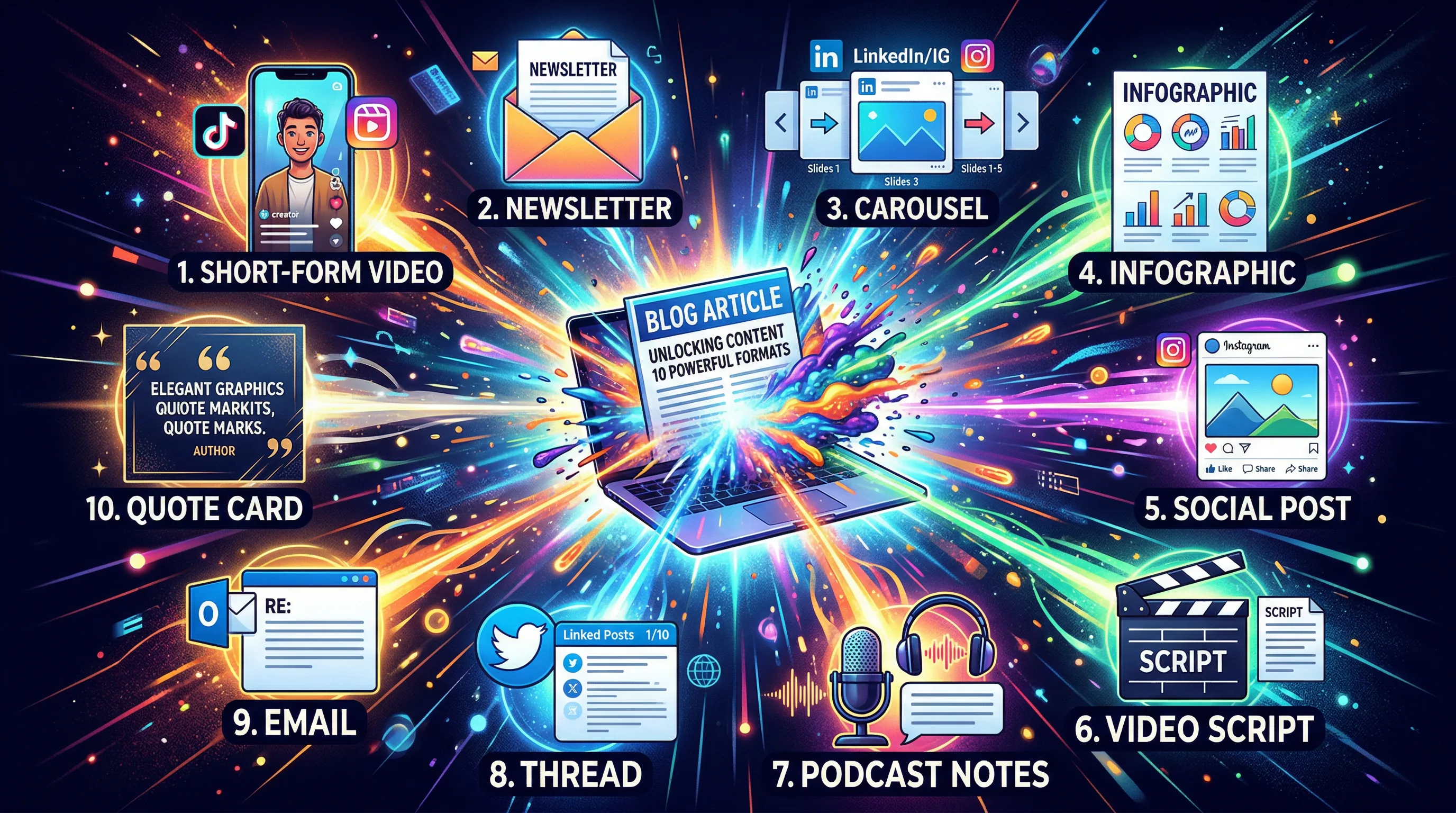
From one core blog post, AI can generate: a Twitter/X thread highlighting key points, a LinkedIn post with professional framing, an email newsletter summary, short-form video scripts for TikTok or Reels, an audio script for podcast narration, Instagram carousel slide text, a Pinterest-optimized graphic brief, YouTube video outline and script, an infographic content brief, and a presentation slide deck outline. That's 10 derivative pieces from one investment of original content creation.
Platform-Specific Optimization
This is the critical difference between repurposing and lazy cross-posting. Each derivative format must be optimized for its specific platform — not just reformatted. A Twitter thread needs different hooks, pacing, and structure than a LinkedIn post. An email summary needs a different call-to-action than a YouTube video description. AI handles the structural adaptation, but you should review each piece for platform-native tone and formatting conventions.
10 AI Repurposing Recipes
These specific recipes transform core content into platform-optimized derivatives.
Blog Post to Social Media Thread
Prompt AI to extract the 5-8 most compelling or concrete points from your blog post. Each point becomes a thread post with its own hook and value statement. The first post hooks attention with the core promise. The last post links back to the full article. This format drives traffic while providing standalone value on the social platform itself.
Article to Email Newsletter
Use AI to distill a 2,000-word article into a 200-300 word newsletter summary that captures the core insight, teases two or three supporting points, and creates enough curiosity to drive clicks to the full article. The newsletter version isn't a miniature version of the article — it's a separate piece designed specifically to motivate email clicks.
Long-Form to Short-Form Video Script
AI can transform a written article into a 60-90 second video script with visual direction notes, on-screen text suggestions, and timing guidance. The video version should focus on one key takeaway from the article rather than trying to compress the entire piece — short-form video works best when it delivers one clear insight with energy and visual interest.
Text to Audio/Podcast Content
Convert written articles into conversational podcast scripts or audio narration guides. The transformation from written to spoken format requires AI to adjust sentence structure (shorter sentences, more transitions), add conversational elements (rhetorical questions, direct address), and suggest pacing notes. AI text-to-speech models can then generate the actual audio from the script.
Written to Visual Infographic Brief
AI extracts data points, statistics, process steps, and comparison elements from written content and organizes them into a structured infographic brief that a designer (or AI image tool) can execute. The brief specifies visual hierarchy, data presentation format, and narrative flow for the visual version.
Multi-Modal Repurposing with AI
Beyond text-to-text reformatting, AI enables true cross-modal content transformation.
Text to Image
Generate blog post illustrations, social media header images, and infographic visuals directly from your article's content concepts. AI image generation transforms written descriptions into visual assets that complement and promote the written content across visual-first platforms.
Text to Video
Create video summaries and promotional clips with AI-generated narration, visuals, and text overlays derived from your written content. These video assets serve as both standalone content on video platforms and promotional trailers that drive viewers to the full written version.
Text to Audio
Transform articles into podcast-style audio content using AI voice synthesis. Listeners who prefer audio consumption can engage with your content library during commutes, workouts, or other audio-friendly contexts — expanding your audience beyond readers to listeners without additional manual production effort.
Artifio is uniquely positioned for this kind of multi-modal repurposing — text, image, audio, and video models in one platform means you can transform content across every format without switching tools, managing multiple subscriptions, or learning multiple interfaces.
The Repurposing Workflow
Step 1: Create your core content piece with repurposing in mind — include multiple distinct sections, data points, and quotable insights that will translate well into derivative formats.
Step 2: Batch repurpose in one focused session. Generate all derivatives from the core piece at once while the content is fresh in your mind. This is more efficient and produces more coherent derivatives than spreading repurposing across multiple days.
Step 3: Review each derivative for platform optimization and schedule across your distribution calendar. Stagger publication across days and platforms for sustained visibility rather than publishing everything simultaneously.
Step 4: Track which derivative formats drive the most engagement and traffic back to the core content. Use this data to prioritize formats in future repurposing efforts — invest more in the formats that perform and less in those that don't resonate with your specific audience.
For workflow optimization strategies, see our content workflow automation guide. For the broader content strategy framework, our marketing strategy guide shows how repurposing fits into your overall approach.
Measuring Repurposing ROI
Tracking the impact of your repurposing efforts ensures you're investing time in the derivative formats that actually drive results rather than producing content for platforms that don't contribute to your business goals.
Attribution Tracking for Derivatives
Use UTM parameters or platform-specific tracking to measure how much traffic each derivative format drives back to your core content. A Twitter thread that generates 500 click-throughs to your blog post delivers measurable, attributable value. An Instagram carousel that gets likes but no click-throughs delivers brand awareness but not direct traffic. Understanding which formats drive which outcomes helps you prioritize your repurposing effort allocation.
Platform-Specific Performance Metrics
Track engagement metrics native to each platform where you publish derivatives: impressions and engagement rate on Twitter/X, reactions and comments on LinkedIn, saves and shares on Instagram, view count and retention on YouTube. High engagement on a platform signals audience-content fit — invest more repurposing effort into formats and platforms where your derivatives consistently resonate.
Efficiency Metrics: Time Per Derivative
Track how long each derivative format takes to produce, including AI generation time plus human review and optimization. Over time, your efficiency should improve as you develop platform-specific prompt templates and editorial shortcuts. If a particular derivative format consistently takes longer than the value it generates, either tighten up the production process or deprioritize that format in favor of more efficient alternatives.
Content Lifecycle Extension
One of repurposing's greatest benefits is extending the productive lifecycle of your content investment. A blog post alone might drive traffic for 3-6 months before it plateaus. But that same post, repurposed into social content, email newsletters, video, and audio over the following weeks and months, continues generating engagement and traffic across multiple channels long after the original blog post's initial traffic spike subsides. Track the total engagement and traffic generated by a core piece plus all its derivatives to understand the true, fully-amortized value of your content production investment.
Frequently Asked Questions
How do I repurpose content with AI?
Start with your core content piece. Use AI to reformat it for each target platform: social media posts, email summaries, video scripts, audio narration. Each repurposed piece should be optimized for its target platform's format and audience, not just copy-pasted in a different wrapper.
What content is best for repurposing?
Long-form, evergreen content with multiple distinct key points. Pillar posts, full how-to guides, and data-driven articles repurpose into the most derivative formats. Short, news-focused, or highly time-sensitive content has limited repurposing potential.
How many formats should I repurpose each piece into?
Target 5-7 formats from each substantial core piece. Not every format suits every piece. Focus on the platforms where your audience is most active and where the content naturally fits the platform's consumption patterns.
Does repurposed content hurt SEO?
No. Each platform is a different distribution channel. A Twitter thread linking back to your blog post does not compete with it in search — it drives traffic to it. Repurposed content amplifies your core content's reach across channels.
Can AI maintain quality across repurposed formats?
AI handles structural reformatting well but platform-specific nuance benefits from human touch. A LinkedIn post requires different framing and tone than an Instagram caption. AI generates the framework efficiently; you add the platform expertise that makes each version feel native.
Repurpose One Piece Into 10 Formats
Text, images, audio, video — all from one platform. Artifio's multi-modal AI makes content repurposing effortless and affordable.