Grok Imagine (I2I) — AI Image Generator
Grok Imagine (I2I) is available on Artifio.ai as part of our unified AI workspace. Powered by xai. Starting at about $0.020 per generation.
Start with Grok Imagine (I2I)

Grok Imagine (I2I) pricing
These prices are calculated from the current model settings. Each row describes the configuration used for that price.
| Settings | Per generation |
|---|---|
| Default settings | $0.020 |
Review the estimate for your selected settings before submitting. Compare model pricing
About Grok Imagine (I2I)
Grok Imagine's image editing variant applies natural-language changes to an existing picture. You hand the xAI Imagine API a source image and a plain instruction, and the model reads the image content and executes the requested change. It shares its engine with the family's text-to-image tier (grok-imagine-image-quality is the documented editing model), and it launched alongside the rest of the Imagine API that xAI opened to developers in early 2026.
Editing is billed for both the input image and the generated output, and the same endpoint scales from a one-line retouch to multi-image composites. On artifio.ai it runs in the same workspace as 100+ other models, pay-per-generation with no separate subscription.
Features
- Edits driven by a plain-language instruction; the source image can be a public URL, a base64-encoded data URI, or a stored file id from xAI's Files API.
- Multi-image editing accepts up to 3 source images in one request for combining subjects, transferring styles, and composing scenes.
- Multi-turn editing chains: each output can feed the next request for iterative refinement of a single image.
- Style transfer across a wide range of looks, from ultra-realistic photography to anime, oil painting, and pencil sketch.
- Single-image edits preserve the input's aspect ratio automatically; multi-image edits accept an explicit aspect ratio parameter.
- Results return as hosted URLs or base64 data with a per-image moderation flag.
What people use it for
- Retouching product or portrait photos with targeted, described changes instead of manual masking.
- Restyling existing images into illustration, sketch, or painting looks for creative reuse.
- Compositing subjects from up to 3 reference photos into one scene.
- Iterative art direction: start from a base image and refine details across several editing rounds.
- Converting brand photography into stylized campaign variants while keeping composition intact.
Reported strengths
- Three input paths (URL, base64, stored file id) make it easy to wire into existing asset pipelines.
- Multi-turn chaining is a documented first-class workflow, not a hack, which suits stepwise refinement.
- The quality tier's style range covers photorealism through hand-drawn looks in one model.
- Aspect-ratio preservation on single-image edits keeps outputs drop-in compatible with the original layout.
Reported limitations
- Single-image edits cannot change the output aspect ratio; reframing requires the multi-image path or a separate generation.
- Multi-image editing caps at 3 source images per request.
- The OpenAI SDK's images.edit() method does not work against this API (it sends multipart form data while xAI requires JSON), so ported OpenAI code needs rework.
- Edited results come back on temporary URLs and go through content-policy review before delivery.
Sources
- Image Editing (xAI Docs)
- Multi-Image Editing (xAI Docs)
- grok-imagine-image-quality model page (xAI Docs)
What Grok Imagine (I2I) is good at
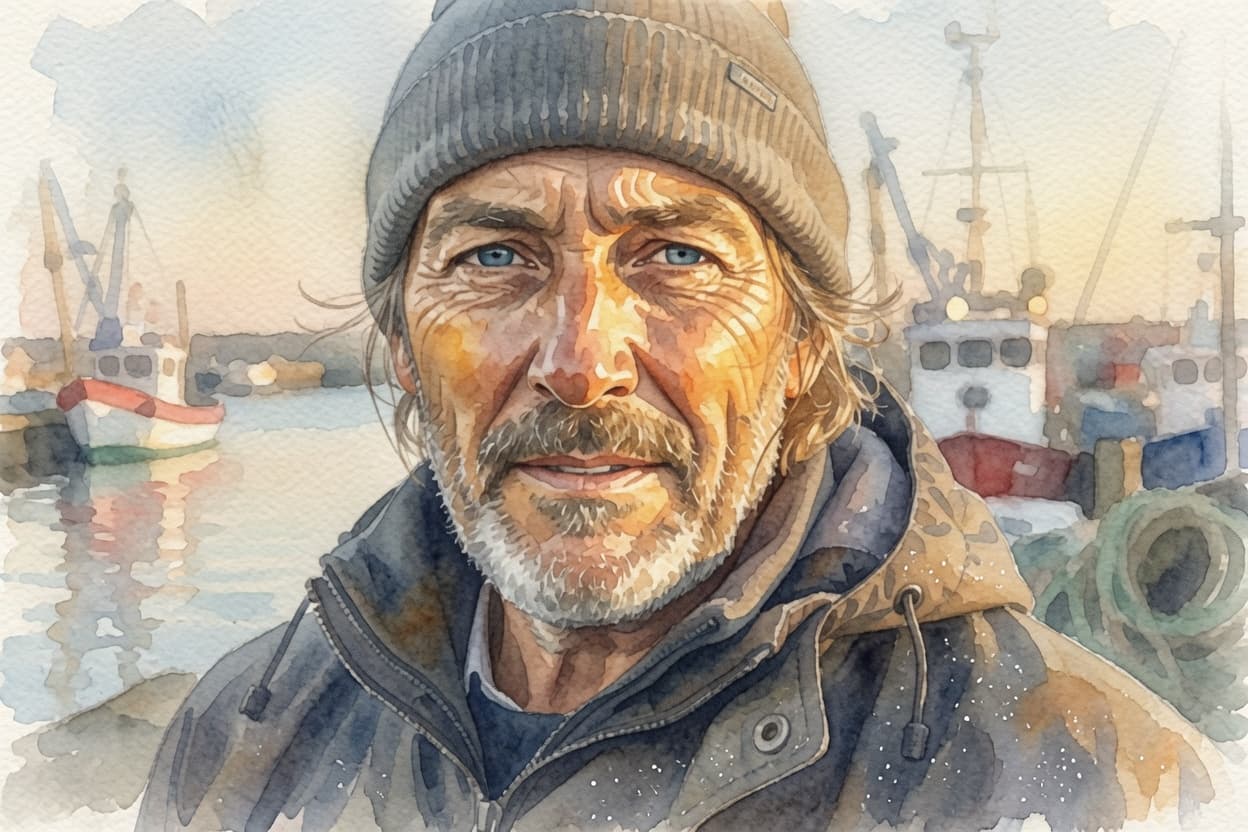
- Committed style transfer: the photo-to-watercolor test produced a genuinely painted result — loose washes, illustrated linework, aged-paper tone — rather than the half-photographic hybrid some editors return.
- Composition and identity survive the conversion: hat, jacket, harbor boats, and the subject's likeness all carried through the repaint.
- Fast and cheap for an editing model: our edit finished in ~15 seconds at one of the lowest prices in the catalogue.
Where Grok Imagine (I2I) falls down
- Faces flatten slightly in stylized conversions — the watercolor softened facial structure more than the source warranted; fine for illustration use, weaker for portrait-faithful edits.
- Unlike its text-to-image sibling (six variants per run), the editing model returns a single output per generation, so exploration costs scale linearly.
- Inherits the family's loose style adherence: expect an artistic interpretation of your instruction rather than a literal one.
Best for
- Fast, cheap style conversions
- Illustration looks from photos
- Iterating on a reference image
Sample outputs
Generated on Artifio with Grok Imagine (I2I). Each sample shows the exact prompt used.
Grok Imagine (I2I) FAQ
What is Grok Imagine (I2I)?
Grok Imagine (I2I) is an AI model (image editing) available on Artifio.ai through xai. You can run it in our workspace from a single shared wallet and download your outputs.
How much does Grok Imagine (I2I) cost on Artifio?
Grok Imagine (I2I) has a starting estimate of $0.020 per generation on Artifio.ai. Review the estimate for your settings in the workspace before confirming. Usage-billed models reconcile the final charge after generation.
How do I use Grok Imagine (I2I) on Artifio?
Click Generate Now to open the workspace at /create/grok-imagine-i2i. Fill in the form fields, review the live cost estimate, and run your generation.
What kind of outputs does Grok Imagine (I2I) produce?
Grok Imagine (I2I) is configured for image editing workflows in the AI content category. See the technical parameters below for supported inputs and options.
Can I try Grok Imagine (I2I) for free?
Sign up free, top up your wallet from $1, and you can run Grok Imagine (I2I) pay-as-you-go without a separate subscription for this model.
Try Grok Imagine (I2I) on Artifio
Open the workspace with this model pre-selected. Review your prompt, settings, and cost before you generate.
Generate Now